CodeVisionAVR includes 1 year of free updates and e-mail technical support. After this period purchase a support package to continue this service.
Quick order Click on the blue buttons to quickly add a product to your cart.
Neptune's core is primarily composed of rock and The following essay examines the technical background, functionality, and ethical considerations surrounding Router Scan v2.60
, a well-known network security tool developed by Stas'M Corp.. The Evolution and Functionality of Router Scan v2.60 Router Scan v2.60
is an application designed to discover and identify various network devices, primarily routers, and test them for known security vulnerabilities. Developed by Stas'M Corp
, the software gained popularity among security researchers and network administrators for its ability to scan large IP ranges rapidly.
Unlike general port scanners, Router Scan is specialized for identifying the make and model of a router and attempting to extract useful information, such as: Wireless Network Credentials : Including SSID and Wi-Fi passwords. Admin Access
: Testing for default or weak credentials to gain entry to the router's web interface. Vulnerability Detection
: Checking for outdated firmware or specific security flaws that could lead to unauthorized access. Technical Operations and Detection
Router Scan v2.60 is a powerful network security tool primarily used for scanning local and wide-area networks to identify routers, retrieve their configurations, and test for vulnerabilities . While it is often discussed in the context of "Wi-Fi password recovery," its technical capabilities go far beyond simple password cracking.
Below is a detailed breakdown of what Router Scan v2.60 does and how it is typically used in a professional or educational context. What is Router Scan v2.60?
Router Scan is a specialized scanning utility designed to locate and identify wireless routers and wireless access points (WAPs) on a network. Its primary function is to collect information from these devices, including:
Identification: Detecting the manufacturer, model, and firmware version of the router.
Credential Retrieval: Attempting to bypass or guess administrative login credentials to access the router's web interface .
Network Details: Extracting sensitive information such as the Wi-Fi SSID, security protocol (WPA/WPA2/WPA3), and network passwords . Key Features of Version 2.60
Version 2.60 introduced several refinements to the tool's core engine, making it faster and more accurate at identifying modern hardware.
Exploit Integration: It includes a library of known vulnerabilities for various router models, allowing it to bypass authentication without needing a password on unpatched systems.
WPS Pin Recovery: The tool can often calculate or retrieve WPS (Wi-Fi Protected Setup) PINs, which can then be used to gain access to the network .
Bulk Scanning: Unlike simple mobile apps, Router Scan can scan entire IP ranges (ranges of thousands of addresses) simultaneously to find vulnerable devices across a broad geographic area. Technical Workflow
Scanning: The user inputs a range of IP addresses. The tool sends requests to common ports (like 80, 443, 1080, and 8080) to see if a router responds.
Fingerprinting: Once a device is found, Router Scan analyzes the HTTP response to determine what kind of router it is.
Exploitation/Authentication: It tries a list of default "factory" passwords (e.g., admin/admin) or uses a known exploit to "dump" the configuration file.
Reporting: All retrieved data—passwords, PINs, and hardware details—is displayed in a clear table for the user. Why Do People Use It?
Security Auditing: Network administrators use it to find "rogue" routers on their networks or to ensure their own hardware isn't vulnerable to default-password attacks.
Educational Research: Cybersecurity students use it to learn about network protocols and the importance of firmware updates.
Password Recovery: Users who have forgotten their own complex router passwords sometimes use these tools as a "last resort" to regain control of their equipment . Security Risks and Ethics
Because Router Scan can expose private network credentials, it is classified as a "dual-use" tool. In many jurisdictions, using it on networks you do not own is illegal. To protect your own router from such tools, you should:
Change Default Passwords: Never leave your router with "admin" as the password.
Disable WPS: Turn off Wi-Fi Protected Setup in your router settings.
Update Firmware: Regularly check for manufacturer updates to patch the exploits that these tools rely on.
Vulnerability Discovery
The /debug endpoint shows:
Ping utility – Host: 127.0.0.1
It accepts a host parameter via POST. Testing for command injection:
Payload:
curl -X POST http://<target_ip>:8080/debug -d "host=127.0.0.1; id"
Exposed admin panel: HTTP 80 or HTTPS 443 returned a vendor-branded login page; reachable from public IP—risk: remote takeover if credentials are known.
Default credential success: scanner authenticated using a built-in default list; risk: full device control.
Firmware fingerprint match to CVE: fingerprinted firmware matched a published advisory allowing remote command injection—risk: high.
What is "Router Scan v2 60 thmyl"?
"Router Scan v2 60 thmyl" appears to be a specific version of a router scanning tool. While detailed information about this exact version might be scarce, it's reasonable to infer that it offers advanced scanning capabilities, potentially including:
Device Discovery: The ability to find and list all devices connected to the network.
Router Identification: Specific features to identify routers, including their make and model.
Security Vulnerability Scanning: Basic scanning for known vulnerabilities that could be exploited by attackers.
Best Practices for Using Router Scanning Tools
Obtain Permission: Always have explicit permission to scan a network.
Use Secure Connections: When scanning, use secure, encrypted connections to protect data.
Comply with Regulations: Be aware of and comply with all relevant laws and regulations.
Ethical and Legal Considerations
Scanning devices you do not own or have explicit authorization to test may be illegal and unethical.
Always obtain written permission and define scope, time, and methods.
Use safe scanning modes and avoid disruptive actions (no destructive payloads).
Disclose findings responsibly to device owners and vendors, and follow coordinated disclosure when relevant.
If everything you try works, you aren't trying hard enough."
Gordon Moore
One thing a leader does is to remove the stigma of mistakes."
Gordon Moore
With engineering, I view this year's failure as next year's opportunity to try it again. Failures are not something to be avoided. You want to have them happen as quickly as you can so you can make progress rapidly."
Gordon Moore
Moore's Law - The number of transistors and resistors on a chip doubles every 24 months."
Gordon Moore
The technology at the leading edge changes so rapidly that you have to keep current after you get out of school. I think probably the most important thing is having good fundamentals."
Gordon Moore
Most of what I learned as an entrepreneur was by trial and error."
Gordon Moore
No physical quantity can continue to change exponentially forever. Your job is delaying forever."
Gordon Moore
If you'd asked me in 1980 what the big impact of microprocessors would be, I probably would have missed the PC. If you asked me in 1990 what was important, I probably would have missed the Internet."
Gordon Moore
Router Scan V2 60 Thmyl ((install)) May 2026
Neptune's core is primarily composed of rock and The following essay examines the technical background, functionality, and ethical considerations surrounding Router Scan v2.60
, a well-known network security tool developed by Stas'M Corp.. The Evolution and Functionality of Router Scan v2.60 Router Scan v2.60
is an application designed to discover and identify various network devices, primarily routers, and test them for known security vulnerabilities. Developed by Stas'M Corp
, the software gained popularity among security researchers and network administrators for its ability to scan large IP ranges rapidly.
Unlike general port scanners, Router Scan is specialized for identifying the make and model of a router and attempting to extract useful information, such as: Wireless Network Credentials : Including SSID and Wi-Fi passwords. Admin Access
: Testing for default or weak credentials to gain entry to the router's web interface. Vulnerability Detection
: Checking for outdated firmware or specific security flaws that could lead to unauthorized access. Technical Operations and Detection
Router Scan v2.60 is a powerful network security tool primarily used for scanning local and wide-area networks to identify routers, retrieve their configurations, and test for vulnerabilities . While it is often discussed in the context of "Wi-Fi password recovery," its technical capabilities go far beyond simple password cracking.
Below is a detailed breakdown of what Router Scan v2.60 does and how it is typically used in a professional or educational context. What is Router Scan v2.60?
Router Scan is a specialized scanning utility designed to locate and identify wireless routers and wireless access points (WAPs) on a network. Its primary function is to collect information from these devices, including:
Identification: Detecting the manufacturer, model, and firmware version of the router.
Credential Retrieval: Attempting to bypass or guess administrative login credentials to access the router's web interface .
Network Details: Extracting sensitive information such as the Wi-Fi SSID, security protocol (WPA/WPA2/WPA3), and network passwords . Key Features of Version 2.60
Version 2.60 introduced several refinements to the tool's core engine, making it faster and more accurate at identifying modern hardware.
Exploit Integration: It includes a library of known vulnerabilities for various router models, allowing it to bypass authentication without needing a password on unpatched systems.
WPS Pin Recovery: The tool can often calculate or retrieve WPS (Wi-Fi Protected Setup) PINs, which can then be used to gain access to the network .
Bulk Scanning: Unlike simple mobile apps, Router Scan can scan entire IP ranges (ranges of thousands of addresses) simultaneously to find vulnerable devices across a broad geographic area. Technical Workflow
Scanning: The user inputs a range of IP addresses. The tool sends requests to common ports (like 80, 443, 1080, and 8080) to see if a router responds.
Fingerprinting: Once a device is found, Router Scan analyzes the HTTP response to determine what kind of router it is.
Exploitation/Authentication: It tries a list of default "factory" passwords (e.g., admin/admin) or uses a known exploit to "dump" the configuration file.
Reporting: All retrieved data—passwords, PINs, and hardware details—is displayed in a clear table for the user. Why Do People Use It?
Security Auditing: Network administrators use it to find "rogue" routers on their networks or to ensure their own hardware isn't vulnerable to default-password attacks.
Educational Research: Cybersecurity students use it to learn about network protocols and the importance of firmware updates.
Password Recovery: Users who have forgotten their own complex router passwords sometimes use these tools as a "last resort" to regain control of their equipment . Security Risks and Ethics
Because Router Scan can expose private network credentials, it is classified as a "dual-use" tool. In many jurisdictions, using it on networks you do not own is illegal. To protect your own router from such tools, you should:
Change Default Passwords: Never leave your router with "admin" as the password.
Disable WPS: Turn off Wi-Fi Protected Setup in your router settings.
Update Firmware: Regularly check for manufacturer updates to patch the exploits that these tools rely on.
Vulnerability Discovery
The /debug endpoint shows:
Ping utility – Host: 127.0.0.1
It accepts a host parameter via POST. Testing for command injection:
Payload:
curl -X POST http://<target_ip>:8080/debug -d "host=127.0.0.1; id"
Exposed admin panel: HTTP 80 or HTTPS 443 returned a vendor-branded login page; reachable from public IP—risk: remote takeover if credentials are known.
Default credential success: scanner authenticated using a built-in default list; risk: full device control.
Firmware fingerprint match to CVE: fingerprinted firmware matched a published advisory allowing remote command injection—risk: high.
What is "Router Scan v2 60 thmyl"?
"Router Scan v2 60 thmyl" appears to be a specific version of a router scanning tool. While detailed information about this exact version might be scarce, it's reasonable to infer that it offers advanced scanning capabilities, potentially including:
Device Discovery: The ability to find and list all devices connected to the network.
Router Identification: Specific features to identify routers, including their make and model.
Security Vulnerability Scanning: Basic scanning for known vulnerabilities that could be exploited by attackers.
Best Practices for Using Router Scanning Tools
Obtain Permission: Always have explicit permission to scan a network.
Use Secure Connections: When scanning, use secure, encrypted connections to protect data.
Comply with Regulations: Be aware of and comply with all relevant laws and regulations.
Ethical and Legal Considerations
Scanning devices you do not own or have explicit authorization to test may be illegal and unethical.
Always obtain written permission and define scope, time, and methods.
Use safe scanning modes and avoid disruptive actions (no destructive payloads).
Disclose findings responsibly to device owners and vendors, and follow coordinated disclosure when relevant.
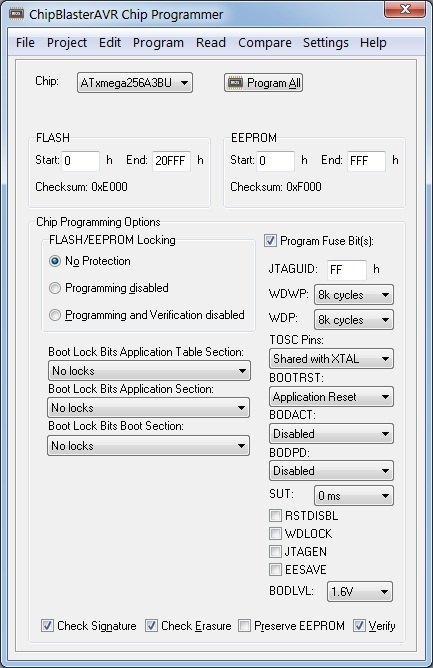
ChipBlasterAVR
A Universal In-System Programming Software for the Microchip AVR family of microcontrollers
Compatible with most AVR development tools
Supports projects
Supports all AVR microcontrollers
This product includes 1 year of free updates and e-mail technical support.
After this period you can purchase 'ChipBlasterAVR Support' to continue to receive free updates and support.
This is a download only product, nothing will be shipped to you. A free evaluation version is available. router scan v2 60 thmyl
Application that runs under Windows® XP, Vista, Windows 7, 8 and 10, 32-bit and 64-bit
Works with USB, serial port (COM) and parallel port (LPT) based programmers
Loads and saves ELF production files, Intel HEX fiels and binary files
Allows visualizing and editing the contents of the FLASH, EEPROM, lock and fuse bytes
Support for projects, allowing easy one button programming of AVR devices.
Fully compatible with CodeVisionAVR projects, allows executing the programming tasks specified in CodeVisionAVR’s Project|Configure|After Build menu. Ideal for production environments.
Unzip the downloaded file in a temporary directory
Run setup.exe to install.
Note: When installing CodeVisionAVR under Windows Vista, the User Account Control (UAC) must be disabled, as outlined below:
press the Windows button and click on the Control Panel link
in the Control Panel window, under the User Accounts and Family Safety, click on the Add or remove user accounts link
a new window will open, click on the Go to the main User Accounts page link located at the bottom of the window
a new window will open, click on the Turn User Account Control on or off link located at the bottom of the window
in the new window that will open, uncheck the Use User Account Control (UAC) to help protect your computer check box and press the OK button to confirm
the computer will have to be restarted for this setting to become effective.
After UAC has been disabled, you may proceed with the ChipBlasterAVR installation:
run the ChipBlasterAVR installer
after the installation is complete, right click on the ChipBlasterAVR icon on the desktop
select Properties in the popup menu that will open
a new window called ChipBlasterAVR Properties will open
select the Compatibility tab
check the Privilege Level|Run this program as an administrator check box and press the OK button to confirm.
YOUR WEBSHOP CART
Fill in the Form - Check Your Cart - Pay - Enjoy CodeVisionAVR
No VAT is charged unless you are a Belgian customer or a EU customer without a VAT number.
If the automated VAT system fails we will check VAT manually after your purchase and refund the paid VAT.
Your creditcard will always be charged in Euro. Prices in other currencies are indicative.
The Pay button is only available after you filled in all required fields.
×
CodeVisionAVR FAQ
How will I receive my license?
You will receive your download link, install pasword and license ID, with a delay that may be up to 12 hours, from HP Info Tech by e-mail. Please also check your e-mail clients Junk folder as the e-mail might end up there. If you ordered the development kit, the hardware will be shipped to you and you will get shipment information.
How can I download CodeVisionAVR?
You can try the product before purchasing by downloading the CodeVisionAVR Evaluation V4.06: Free, 4kbytes code size limited version. PCF8563, PCF8583, DS1302, DS1307, DS2430, DS2433 libraries are not included. Includes also the Evaluation version of the LCD Vision font editor, with disabled saving of the generated font C source code.
The paid version can be downloaded @ CodeVisionAVR V4.06. This version does require an activiation code which is send to you after your purchase. This commercial version also includes the full LCD Vision font editor. The Advanced license is required to use LCD Vision and the color graphic TFT LCD libraries.
Where can I find the CodeVisionAVR User Manual?
Just download it: cvavrman.zip
How do I setup the software?
CodeVisionAVR V3 is designed to be used both in its own IDE and also as an Extension in Atmel Studio 7 or the older 6.2.1563. It is compatible with all Windows® versions down to XP. For the Atmel Studio Extension to be installed correctly, Atmel Studio must be already present on the computer, before the CodeVisionAVR installer is launched.
Note that while installing and using CodeVisionAVR you must be logged in as Administrator.
You must uninstall any Atmel Studio version older then 6.2.1563 and remove all remaining files in C:\Program Files (x86)\Atmel BEFORE running the CodeVisionAVR installer.
I get a warning from my virus scanner while installing CodeVisionAVR !
CodeVisionAVR is protected by WinLicense from Oreans Technologies. This protection may trigger false alarms in some antivirurses like BitDefender, ESET, AVAST or AVG, preventing CodeVisionAVR from being executed. In such cases you need to add the whole CodeVisionAVR installation \BIN folder to the antivirus file
exclusion list.
Is Atmel Studio required?
No it is not. You can use CodeVisionAVR in its own IDE. For debuging you can also use the AVR Studio 4.19 debugger.
I want to use an older version of CodeVisionAVR
All previous versions of CodeVisionAVR can be downloaded, just ask us for the correct download link. Mind you that each version has a different install password. Please keep a record of the install password(s) which we send you. If you've lost your install password feel free to ask us. You can use the contact form.
Will I receive an invoice for my purchase?
Invoices are send by e-mail for all purchases. It might take a few weeks before you receive your invoice.
Privacy
Our shop does not store any information in an online database. That's why you can not use a login and have to enter your invoice data for each purchase. Your address is only used to send you an invoice. Your e-mail address is used by UVee to send you a purchase confirmation, and by HP Info Tech to send you the license. HP Info Tech will store your address to keep track of your license. On simple request (use the contact form below) UVee will erase all your data, or send you a copy of all your data records.
While using this webshop cookies are used to store your webshop data temporarily on your computer.
Payment with Stripe versus PayPal
Our new webshop uses the services of Stripe to handle your payments. Stripe supports all common creditcards, but also Apple Pay and Google Checkout in selected regions. It also supports local bank cards (region dependant). PayPal recently changed their payment system which resulted in higher costs for both you and us.
What about shipping costs?
CodeVisionAVR and ChipBlasterAVR are download only products, no shipping costs are charged.
All other products are shipped with bPost (first class Mail) and we charge €9.90 for EU destinations and €19.90 for all other destinations. You will get a tracking number once your order has been shipped. Shipping time varies depending on the location, EU destinations usually arrive within 5 working days. Longer distance shipments might take longer. If you want us to send your order with your preferred carrier (on your account), add your carrier account number in the comment field, we'll refund you the charged shipping costs.
Are there any export restrictions
We do not sell to residents of Iran, North Korea, and Russian companies with military subsidaries
CONTACT
Lets get in touch. Send us a message.
Our Company
UVee, originally launched in 1994, has quickly established itself as an innovative and dynamic company. Our main offices are located in Leuven, near the Belgian capital of Brussels. We provide high quality engineering and consulting services for embedded electronics, build and distribute UV Therapy Systems for treatment of skin disorders, and recently launched our new KartTracker kart race timing system. We also maintain a Tesla logging system.